


From “Build Us an AI Meeting Bot” to Production: Architecting a Reliable AI Meeting Assistant on Microsoft Teams + Azure
This article reflects a real-world production architecture and the engineering trade-offs encountered while building it. AI was used as a drafting assistant to improve structure and readability,…
August 4, 2026 · 7 min read
This article reflects a real-world production architecture and the engineering trade-offs encountered while building it. AI was used as a drafting assistant to improve structure and readability, while the architectural decisions, implementation experience, and technical observations are based on practical engineering work.
“Can we build an AI bot that summarizes every Teams meeting?”
That was the request.
On paper, it sounds straightforward:
- Join a Microsoft Teams meeting
- Wait for it to finish
- Retrieve the transcript
- Ask GPT to generate a summary
- Post the results back into Teams
It sounds like an AI project.
It isn’t.
It’s an event-driven distributed system that happens to use AI.
The language model is actually the easiest component. The real engineering lives in everything surrounding it—Microsoft Graph permissions, webhook reliability, transcript timing, retry policies, storage consistency, monitoring, and operational cost.
We recently built exactly this architecture using Microsoft Teams, Microsoft Graph, Azure OpenAI, Azure Bot Framework, Cosmos DB, and Azure infrastructure. This article isn’t the marketing version. It’s the production version.
TL;DR
We built a Teams bot that:
- Detects when a Teams meeting ends
- Retrieves the meeting transcript using Microsoft Graph
- Stores the raw transcript in Cosmos DB
- Uses Azure OpenAI to generate:
- Executive summary
- Action items
- Key discussion points
- Updates Cosmos DB with AI-generated insights
- Posts a rich Adaptive Card back into the Teams conversation
The entire workflow typically completes within 3–7 minutes after a meeting ends.
The architecture spans five major layers:
- Microsoft Teams Platform
- Azure Bot Framework
- AI Services
- Storage
- Azure Infrastructure
Every layer introduces production challenges that don’t appear in proof-of-concept demos.
What You’re Actually Signing Up For
If you’re planning a similar solution, here’s what you’re really building:
- Azure AD application registration with Microsoft Graph permissions that require administrator consent—not a five-minute configuration.
- A 2–5 minute delay before meeting transcripts become available, requiring asynchronous retries instead of synchronous processing.
- Multiple Azure OpenAI calls per meeting, making token consumption and cost planning essential.
- A two-phase persistence model that protects raw meeting transcripts before AI processing begins.
- Adaptive Cards that transform AI output into something users actually consume.
None of these problems are individually difficult.
Collectively, they’re what determine whether your AI meeting assistant becomes a trusted production system—or another abandoned proof of concept.
The Architecture, in One Picture
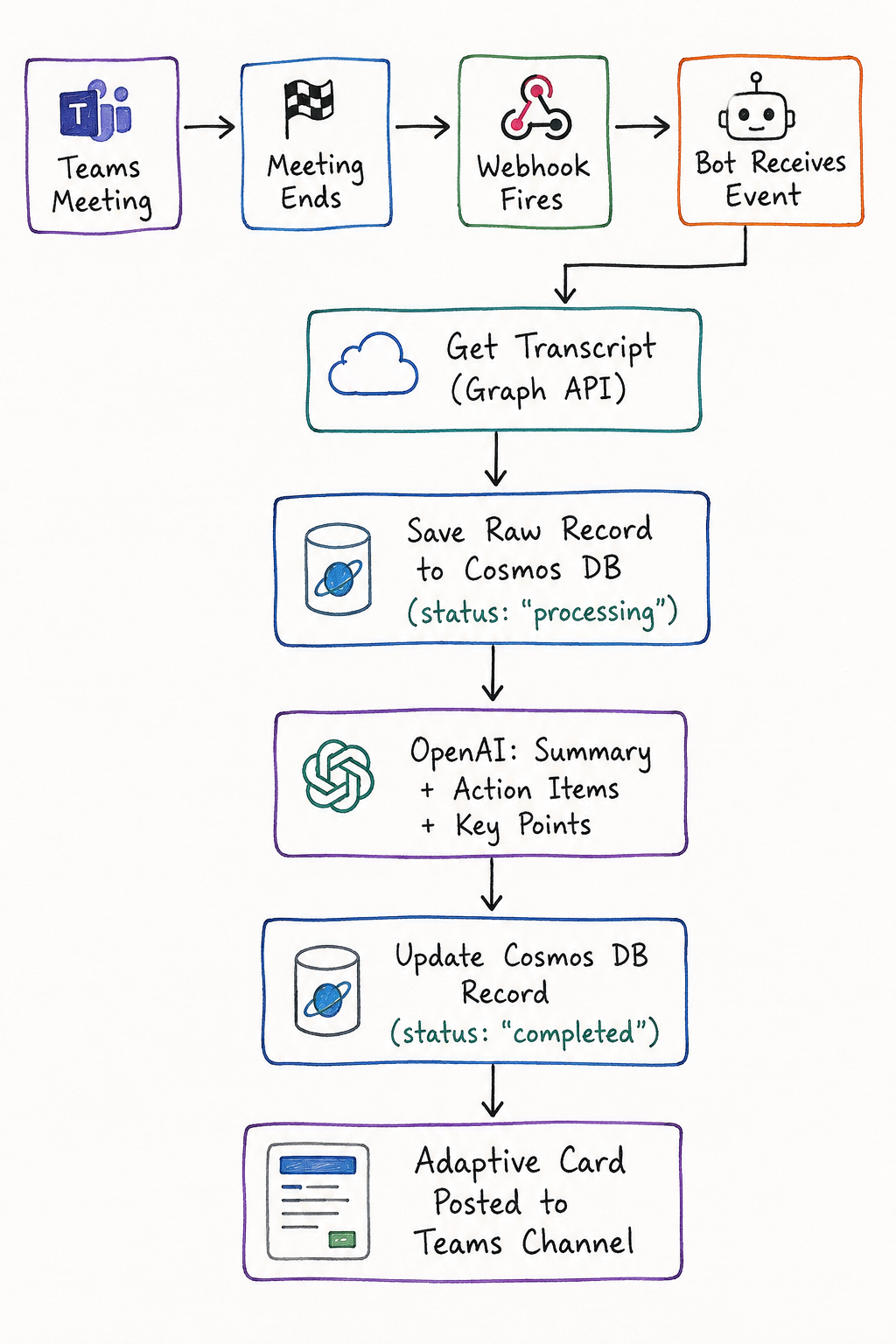
Behind this workflow sit five logical layers:
- Microsoft Teams Platform (Meetings, Graph API, Adaptive Cards)
- Azure Bot Framework (event orchestration)
- AI Services (Azure OpenAI)
- Storage (Cosmos DB and Blob Storage)
- Azure Infrastructure (App Service, Service Bus, Key Vault, Application Insights)
The architecture diagram is the easy 20%.
The retry logic, permission management, observability, and operational resilience are the other 80%—and they’re the parts that never fit neatly onto a slide.
Why This Architecture?
Every component exists because it solves a production problem.
| Production Requirement | Architecture Decision |
|---|---|
| Event-driven workflow | Microsoft Graph Webhooks |
| Loose coupling | Azure Service Bus |
| Reliable retries | Queue-based processing |
| AI inference | Azure OpenAI |
| Durable storage | Cosmos DB |
| Large transcript storage | Azure Blob Storage |
| Secret management | Azure Key Vault |
| Monitoring | Application Insights |
| Teams integration | Azure Bot Framework + Adaptive Cards |
Good architecture isn’t about using more Azure services.
It’s about assigning one clear responsibility to each service while keeping the system loosely coupled and resilient.
Why Azure Bot Framework?
Azure Bot Framework isn’t simply a chatbot SDK.
In this solution, it acts as the orchestration layer between Microsoft Teams, Microsoft Graph, Azure services, and the AI pipeline.
Its responsibilities include:
- Receiving meeting lifecycle events
- Authenticating Microsoft Graph requests
- Triggering asynchronous processing
- Managing retries and failures
- Posting Adaptive Cards back into Teams
Notice what’s missing.
The bot doesn’t perform AI analysis.
It orchestrates it.
Keeping the bot lightweight while moving expensive operations into asynchronous workers makes the solution significantly more scalable and reliable.
Where It Actually Gets Hard
1. The Transcript Isn’t There When You Think It Is
Your webhook fires immediately when the meeting ends.
The transcript doesn’t.
Microsoft Teams typically needs 2–5 minutes before the transcript becomes available through Microsoft Graph.
Call the API too early, and you’ll simply receive an empty response.
The solution isn’t complicated—but it is essential:
- Queue the event
- Retry using exponential backoff
- Continue polling for a configurable period
- Treat “Transcript not ready” as a temporary state rather than a failure
A surprising number of failed implementations stop here.
2. Admin Consent Is a Conversation, Not a Checkbox
Permissions such as:
- OnlineMeetingTranscript.Read.All
- OnlineMeetings.Read.All
require application-level Microsoft Graph permissions.
That means administrator consent.
Inside enterprise environments, this often involves:
- Security review
- Identity governance approval
- Risk assessment
- Administrative sign-off
The critical path is rarely the code.
It’s the approval process.
3. AI Costs Scale Faster Than People Expect
Generating:
- Executive Summary
- Action Items
- Key Decisions
using separate prompts produces consistently better results.
It also multiplies token consumption.
For an organization running 200 meetings each week, that’s approximately 600 Azure OpenAI requests, with transcript sizes frequently reaching thousands of tokens.
Before promising “AI summaries for every meeting,” spend five minutes estimating:
- Meeting volume
- Average transcript size
- Token consumption
- Monthly operating cost
Finance departments appreciate architects who perform this calculation early.
4. Save the Source Before Trusting the AI
Cosmos DB is written twice.
First:
Status = Processing
Transcript = Stored
Later:
Status = Completed
Summary
Action Items
Key Points
This isn’t over-engineering.
It guarantees that even if Azure OpenAI fails, the original transcript is preserved.
AI output can always be regenerated.
Source data often cannot.
5. The UI Isn’t a Footnote
A wall of AI-generated text quickly becomes background noise.
An Adaptive Card containing:
- Executive Summary
- Action Items
- Key Decisions
- Participants
- Meeting metadata
is dramatically more useful.
Sometimes the simplest investment produces the highest user adoption.
Reliability Is More Important Than Intelligence
One of the biggest lessons from this project was that users don’t judge AI by how intelligent it is.
They judge it by whether it works every single time.
Production systems should expect failure as a normal operating condition.
That means planning for:
- Microsoft Graph rate limiting (429)
- Duplicate webhook deliveries
- Temporary transcript delays
- Azure OpenAI timeouts
- Cosmos DB retries
- Network interruptions
Reliable systems aren’t built by avoiding failures.
They’re built by recovering from them automatically.
Design for Idempotency
Webhook events aren’t guaranteed to arrive exactly once.
Every meeting should have a unique identifier, and processing should always begin by checking whether that meeting has already been handled.
If the event has already been processed, the workflow simply exits.
This small architectural decision prevents duplicate summaries, inconsistent data, and unnecessary AI costs.
Observability Matters
Production systems need visibility.
Application Insights should help answer questions such as:
- How long does transcript retrieval take?
- How many retries occurred?
- Which Microsoft Graph requests failed?
- How many Azure OpenAI tokens were consumed?
- Which meetings failed processing?
- What is the average end-to-end processing time?
Without telemetry, debugging becomes guesswork.
Security Isn’t Optional
Meeting transcripts often contain confidential business discussions.
Security therefore becomes a first-class architectural concern.
Recommended practices include:
- Microsoft Entra ID authentication
- Least-privilege Microsoft Graph permissions
- Azure Managed Identity wherever possible
- Azure Key Vault for secrets
- Encryption at rest
- Encryption in transit
- Audit logging
- Data retention policies
- PII review before AI processing
Enterprise AI systems should be secure by design—not secured later.
Final Thoughts
Building an AI meeting assistant isn’t primarily an AI problem.
It’s an event-driven distributed system that happens to use AI.
The language model generates the summary.
The architecture determines whether that summary is delivered reliably, securely, and at a cost the business can sustain.
That’s the difference between a demo and a production system.
If there’s one lesson from this project, it’s this:
Build the failure paths before you build the happy path.
A bot that occasionally produces a brilliant summary is less valuable than one that consistently delivers a good one. The first time it silently misses an important meeting, user trust disappears—and rebuilding that trust is far harder than writing retry logic.
Go deeper
Have the same problem, different constraints?
These notes are general by necessity. Tell us the specifics and we will tell you how we would approach it.
We reply within one business day